How to Improve SEO on Squarespace (Step-by-Step Beginner’s Guide)
A Simple Guide to Getting Your Business Found Online by Search Engines AND AI Tools

You’re Not Just Building a Website… You’re Building a Way for People to Find Your Business!
I want to start here, because this matters: you’re not just creating a website to “have one.” You’re creating a way for the people your business is here to support to actually find you. Your business exists for a reason; you have something valuable to offer, and you’re here to make an impact. Your website is one of the primary ways that impact begins!
So how do you bring more potential clients to your website? (Without relying on expensive paid ads.) Because, this is where so many entrepreneurs get stuck: they launch a beautiful website and then wonder why no one is finding it. That’s where SEO comes in.
And before you panic, this doesn’t have to be overwhelming. I’m going to walk you through a simple, strategic approach to SEO that I use with my own website and in my client projects.
WHAT’S INSIDE THIS POST:
Intro: How Long Does SEO Take and is SEO still Worth it?
I. How to Find the Right Keyword Phrases for Your Website
II. Structure Each Webpage for SEO
III. How to Optimize Images for SEO
IV. Optimize Your Squarespace Page Settings
V. How Internal Links Improve SEO
VI. How to Use Blogging for SEO
VIII. Excellent SEO Tools for Small Business Websites
IX. What are Backlinks & How to Use them to Boost Your SEO
X. How to Use Instagram to Boost Your Website’s Traffic
How Long Does SEO Take to Get Results? And, is SEO Worth it in the Age of AI?
First, let’s set the expectation: SEO is a long game (but a powerful one!) when it comes to search engines such as Google.
It's worth taking the time to set it up. One of my earliest clients now ranks on page 1 of Google search results, and she recently shared with me that the majority of client inquiries are coming from Google! (Not one paid ad. Needless to say, she was excited!)
SEO is a long-term investment. You may begin noticing small improvements within 4–8 weeks, with stronger momentum building around the 3–6 month mark. Search engines need time to crawl, index, and evaluate your updates, and consistency can make a difference.
The great part? Once your foundation is in place, your SEO continues working quietly in the background, building strength over time. It’s doing the marketing work for you, even if you take a week off to spend time with your family!
AND, did you know? ⟶ Squarespace has an Analytics tool that you can use to watch how your website is performing after you’ve set up your SEO! You can use this tool to see what keywords are working and which ones you may want to switch out after 6 months.
Second, SEO does matter even with AI!
You could begin noticing more immediate wins with AI search when you optimize your website with keyword phrases. Depending on how established and active your website is, we’re talking days to weeks to being cited in AI results. (I’m speaking from experience here). I’ll be sharing more about what to do to get your website noticed by AI in another post, but for now, keep working on baking in good SEO!
Your steady, thoughtful work will pay off!
Step 1: How to Find the Right Keyword Phrases for Your Website (beginner-friendly guide)
Start with the right keywords. These are your foundation. And YES , keyword phrases DO matter in the world of AI!
Before you begin following the steps described below on your website, you need clarity on what your ideal client is actually searching for on search engines such as Google and within AI tools such as ChatGPT, Perplexity, etc... Not broad, generic terms, but specific phrases. These are called long-tail keywords, and they’re especially powerful for small businesses. Why? Because long-tail keywords can help small businesses stand out online in a big market. For example…
Instead of:
“Business coach”
“Estate Planning Law Firm”
(These are a very broad phrases used in a large market. Established, higher-ranked websites will more than like “own” that market in Google pages and in AI visibility).
Try:
“Business coach for Christian women entrepreneurs”
“Estate Planning Law Firm in Cincinnati, OH”
(These are niche-specific, long-tail keyword phrases that help search engines and AI tools clearly understand what each page of your website is about, and connect the right potential clients to you when they search.)
Here’s how to find your long-tail keyword phrases:
Think about what your ideal client would type into Google
Search those phrases and see what comes up
Use tools like Ubersuggest or Semrush to refine them
Look for keywords with:
Moderate difficulty (around 15–30)
Search volume between 100–1000 (or lower for niche services)
And one important note:
Each page on your website should have its own keyword focus. For example, don’t reuse the long-tail keyword phrase that you used on your homepage (e.g. Business Coach for Christian Women Entrepreneurs) on your About or Services pages. You’ll want to have a unique long-tail keyword phrase for each of those pages.
Step 2: How to Structure Website Pages for SEO (H1, H2 Headings Explained)
Structure Your Pages So Google (and AI Tools) Understand Them
Search engines and AI tools are scanning your website trying to answer one question: “What is this page about?” You want to make that very clear. This is where you get to use the long-tail keyword phrases you researched in Step 1. Here’s what you do:
Use only one H1 header per page (your main headline), and keep it at the top of your webpage.
Include your long-tail keyword phrase in that H1.
Use H2s to support and expand on that topic. H2 headers are also great in helping search engines and AI tools understand if your website’s page has information relevant to the person who is doing the search.
For example:
H1: Business Coaching for Executive Women
H2: What You Can Expect from Coaching
Paragraph: Explain what to expect
H2: How Much Executive Coaching Costs
Paragraph: Explain costs
This structure doesn’t just help with SEO and AI tools, it also makes your site easier for your visitors to read and engage with.
Step 3: How to Optimize Images for SEO (Filenames, Alt Text, and Site Speed)
Don’t Skip Your Images (They Matter More Than You Think)
Your images are another opportunity to strengthen your SEO. Instead of uploading files named: IMG_2345.jpg, rename them to something descriptive like: cincinnati-estate-lawyer.jpg
Then add alt text that clearly describes the image, and naturally includes your keywords where appropriate.
Also, keep your image sizes optimized (under 500 KB) so your site loads quickly. A slow-loading website can ding your site’s ranking with search engines.
I talk more about this in detail and with further how-to instructions in my post, Speed Up Your Squarespace Website Using Your Photos.
Step 4: How to Write SEO Titles and Meta Descriptions That Get Clicks
Optimize Your Squarespace Page Settings
Every page on your Squarespace site has built-in SEO settings which tell search engines and AI tools what the webpages in your website are about. These are also the previews that are seen in search results. Think of this as your first impression in Google search results. It’s what gets someone to choose your site over someone else’s.
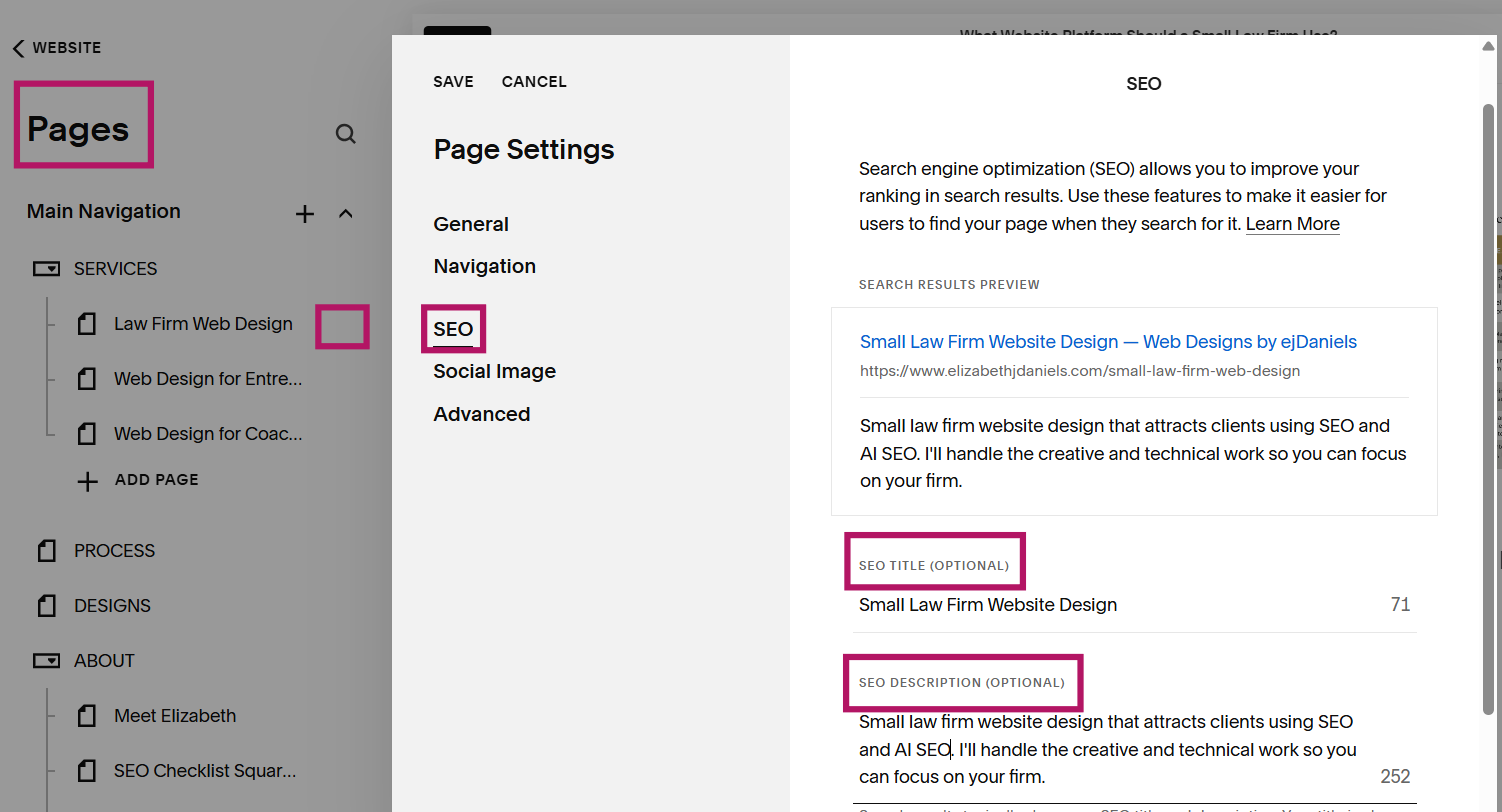
For each page, go to your Pages, click on the gear icon next to the page you want to edit, click SEO in the Page Settings box, and add the following:
An SEO title - Use your long-tail keyword phrase here if it helps users, search engines, and AI tools understand what this page is about.
An SEO description - This is a short description (150-160 characters) of what someone should expect when they click on this page.
Would you like the printable Squarespace SEO Checklist? Head here to claim yours!
Step 5: How Internal Linking Helps AI Tools, Improves SEO, & Keeps Visitors on Your Website
Using internal links will guide your visitors, help AI Tools, and boost your SEO. Internal linking is one of the simplest, and most overlooked, SEO strategies. It tells Google and AI tools how your content is connected, and it keeps visitors on your site longer.
Here’s what that can look like:
Linking blog posts to your services
Linking between related service pages
Using clear, descriptive link text (not “click here”) Example: “Book Discovery Call”, or “Coaching for Women Services”.
Using internal links helps to create a path for website visitors move through your website with understanding. And that includes search engines and AI tools too.
Step 6: How to Use Blogging for SEO (Simple Strategy for Small Business Owners)
Using blogging strategically can be an excellent marketing tool for your business!
Blogging can be one of the most powerful ways to grow your SEO and capture the attention of AI tools. Make sure to do the following with each blog post:
Choose one keyword phrase that is different from your main site’s pages (you don’t want to compete for SEO with your other pages by using the same keyword phrase)
Use it in your title, headings, and SEO description
Answer a real question your ideal client is already asking.
This is how you meet people right where they are in their search, which can help bring your ideal clients to your website.
For more tips on this, I talk more about this topic in my post, Should You Be Blogging for Business?
Step 7: Fix “Not Linked” Pages and Improve Your Website SEO
Clean Up What’s Confusing Search Engines
If you have pages on your site that aren’t linked anywhere (“Not Linked” pages), they can actually dilute your SEO.
Go to your website pages and look through your “Not Linked” pages that you’re no longer using.
Delete pages you no longer need
Or intentionally link them where they make sense
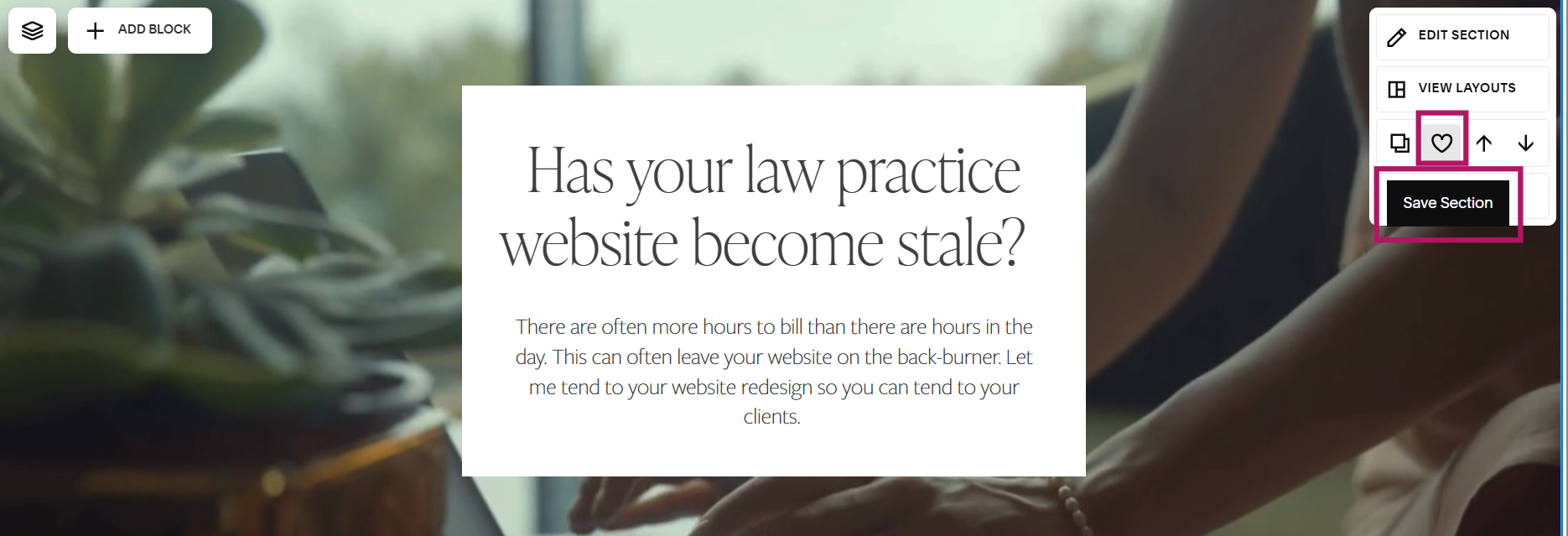
TIP: If you’re not using the pages and won’t be in the foreseen future, but you have content on those pages that you’ve been wanting to hang onto, Squarespace 7.1 allows you to save sections on a webpage! See photo below, top right corner. You’ll have to be in edit mode on the webpage to see the menu with the Save Section heart. Click the heart and your section is saved! Save the sections with the content you want keep, then delete the page.
Step 8: Excellent SEO Tools for Small Business Websites (Google + Squarespace Setup)
Setting up these tools can help your website be found online and help your business grow!
There are a few key tools that help your SEO gain traction faster:
If you serve clients locally (even partially), I highly recommended having a Google Business Profile! This is also a very helpful tool for business owners who offer services nationwide. Over time, this can help generate more traffic to your website. Once set up, be sure to utilize the following features:
Share recent blog posts, specials, updates using “Add Update”
Reviews from clients. Online reviews can help boost your online credibility. Respond to each review, positive or negative. “An online review strategy can be part of your brand management plan or process. The ability to be able to listen to what is being said about you online gives you the opportunity to to respond appropriately. A resolved negative comment is far less potent than one that goes unanswered.” (SEO for Growth, Antsch & Singleton)
Google Search Console (to get your site indexed)
Do this after setting up your Google Business Profile. Doing this will begin the process of getting your site visible in Google search results faster. These instructions via Squarespace will walk you through how to get things set up.
Squarespace Analytics (to track what’s working)
These tools give you insight into what’s happening behind the scenes—so you can refine over time.
Step 9: What Are Backlinks? How to Build Website Authority for Better SEO
Build Credibility Through Backlinks
Backlinks are links from other websites to yours, and they are one of the strongest SEO signals. Here Some simple ways to start:
Guest blog or be a podcast guest
Get listed in directories
Create valuable content others want to share
This is how your website begins to build authority beyond itself.
Step 10: How to Use Instagram to Boost Your Website’s Traffic
Think about it this way: more traffic to your website = boost in SEO rankings.

If you’re on Instagram, set up a link-in-bio page directly on your website!
Using 3rd-party linkin-bio sites redirects precious website clicks to another platform.
See my post on how to use Instagram to boost traffic to your website for an example of a link-in-bio page.
Simple SEO Tips for Small Business Websites
Let’s bring this back to the heart of it…You’re not doing SEO just to “rank on Google” or be cited on AI tools. You’re doing it so the people you’re here to support can actually find you.
So your message reaches them.
So your work impacts them.
So your business can grow in a way that blesses others.
Because when you work on your website, you’re not just building something that looks good. You’re building something that:
Gets people to the door (SEO)
Invites them in (clear, compelling copy)
Encourages them to stay (design + user experience)
And guides them to take that next step (calls to action)
That’s how a website starts to work for your business.
Done-for-You Squarespace SEO Services (VIP SEO + AI Optimization Week)
If you’re reading this and thinking, “Okay… I get it, but I don’t want to implement all of this myself…”
That’s exactly why I offer my SEO + AI Optimization Service!
I come in, optimize your Squarespace site using these exact strategies, and set your website up with a strong, intentional SEO foundation, so it can start working for you long-term!
Frequently Asked Questions About Squarespace SEO
-
Improving SEO on your Squarespace website starts with a strong foundation: being clear about what each page on your website it about.
Focus on choosing the right keyword phrases for each page, using clear headings (H1 and H2), optimizing your page titles and descriptions, and adding alt text to your images. I discuss how to do all of these things above OR you can download my Simple SEO Checklist for Squarespace here.
From there, continue strengthening your SEO by linking between your pages, blogging consistently, and using tools like Google Search Console to track your progress.
-
SEO takes time to build momentum.
You may start noticing small improvements within 4–8 weeks, with more consistent traffic growth happening around the 3–6 month mark.
Search engines need time to crawl and understand your website, so consistency really matters here.
The encouraging part? Once your SEO is set up well, it continues working for you in the background.
-
The best keywords are the ones your ideal clients are already searching for.
For small businesses, long-tail keywords (more specific phrases) tend to work best because they target a clear audience and are easier to rank for.
For example, instead of using a broad term like “business coach,” you might use something more specific like “business coach for women entrepreneurs.”
Each page on your website should have its own unique keyword focus.
-
Yes! When done strategically, blogging can significantly improve your SEO.
Each blog post is an opportunity to target a new keyword and answer a specific question your ideal client is already asking.
Over time, this helps your website show up in more searches and builds trust with your audience before they ever reach out.
Read more about this in my post, Should I Be Blogging for Business?
-
If you’re just getting started, focus on three things:
Clarity, consistency, and structure.
Make it clear what each page is about, use consistent keyword phrases, and structure your content in a way that’s easy for both people and search engines to understand.
-
Yes, it’s highly recommended for SEO.
Google Search Console helps your website get indexed faster and allows you to see how your site is performing in search results.
It gives you insight into what keywords are bringing people to your site and helps you identify opportunities to improve over time.
-
Backlinks are links from other websites that point to yours, and they help build your website’s credibility in the eyes of search engines.
They aren’t something you need to have right away, but they are valuable as your business grows.
You can start building backlinks by guest blogging, being featured on podcasts, or creating content that others naturally want to share.
-
No problem! I’ve got you covered. Check out my SEO + AI Optimization Service here. I’d be happy to connect over a complimentary consult!
Final Encouragement
You don’t have to do this perfectly. You just have to start! Every step you take is making it easier for your future clients to find you. And that matters more than you think.
Drop me a line with any questions or if you’d like to inquire about my SEO + AI Optimization Service! I’d be delighted to connect!